
Google Play’s 2027 Memory Limits: What They Mean for Ad Mediation and Monetization
RAM is no longer cheap, and Google is tightening memory expectations for Android apps.
Come February 2027, Google Play will start counting every megabyte your app or game uses, and it will keep an eye on any extra code you ship. Go over the line, and your app could sink in the store rankings or get blocked from updates. If you rely on ads, this is not simply a technical headache. It could hit your bottom line.
What Google is changing
Google says memory is getting pricier and hardware is harder to come by. Phone makers are trimming RAM, so those budget phones that used to have 6 or 8 GB now show up with just 4. Apps, on the other hand, keep demanding more. On-device AI is only going to make that worse. Google’s fix is simple: Push apps toward leaner builds through Play requirements.
Three areas are affected:
- Dynamic memory. Anonymous RSS plus swap/zRAM: the memory your app actually holds while it runs.
- Bitmap memory. The memory eaten by images.
- DEX code. The executable code inside your app.
The numbers to know
Google looks at the top 10 percent of your app’s memory use over a month. If your worst sessions break the rules, you are over the line.
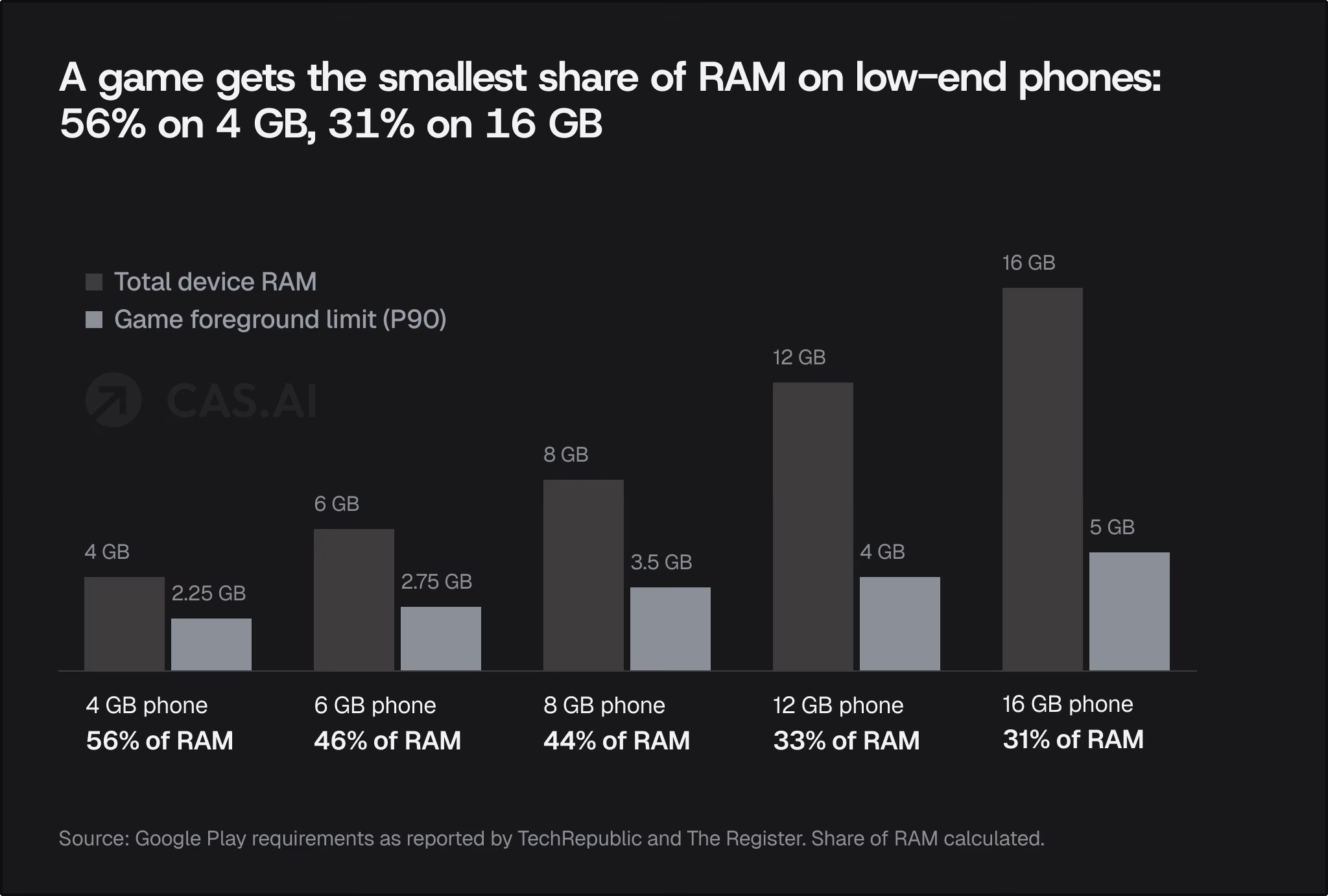
The limits change depending on how much RAM the device has and whether your app is running up front or sitting in the background. Games get a bit more breathing room than regular apps.
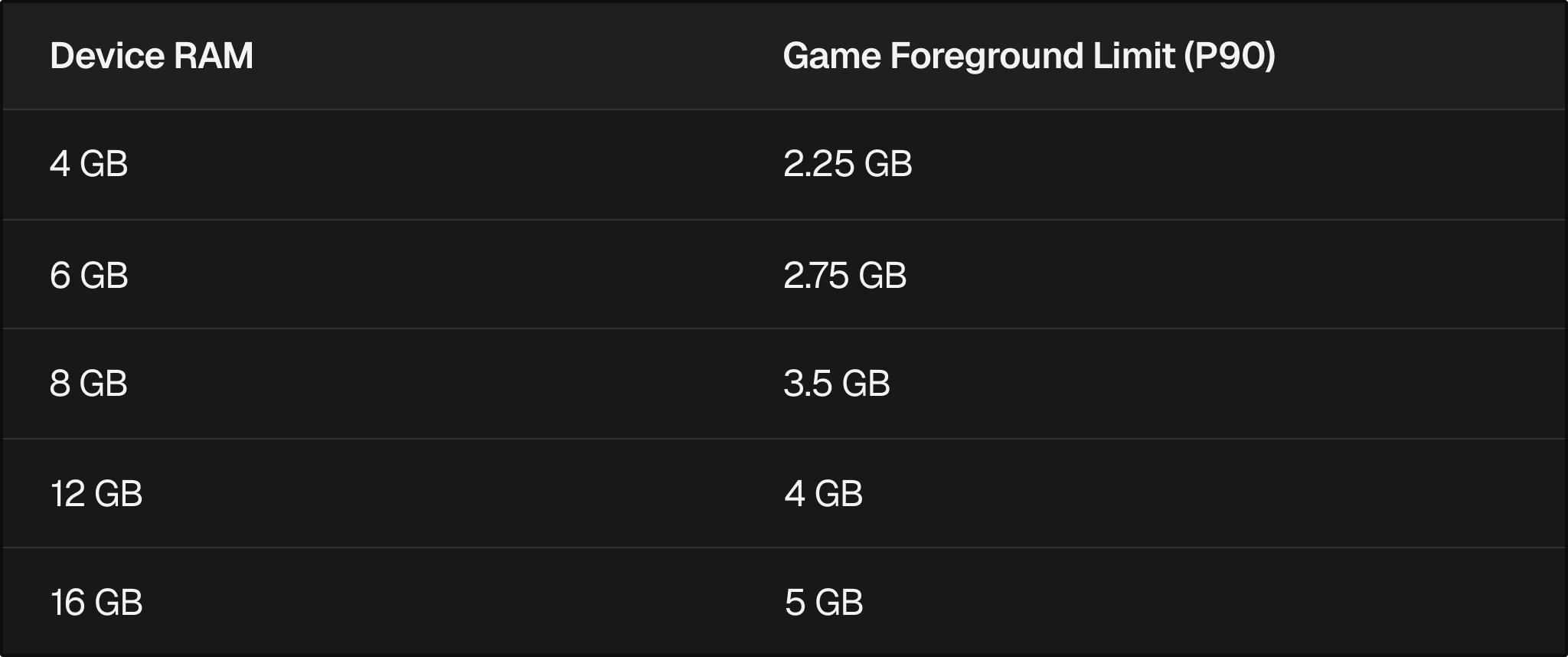
For most apps, the ceiling is lower. On a 4 GB phone, you get about 2 GB to play with when your app is in use. On an 8 GB device, that goes up to 2.25 GB. If your app is running in the background on an 8 GB phone, you get about 1.5 GB.
Images have their own rules. If your app uses more than 200 MB of image memory while running or doing background work, you are in trouble. If it is just cached, the limit jumps to 400 MB.
On the code front, starting February 2027, new app versions have to shrink, optimize, and obfuscate at least a quarter of their DEX code. This rule kicks in if your app has more than 10 MB of DEX, or if your game has more than 50 MB. Google likes R8 for this, but any tool that gets you there will do.
Timeline
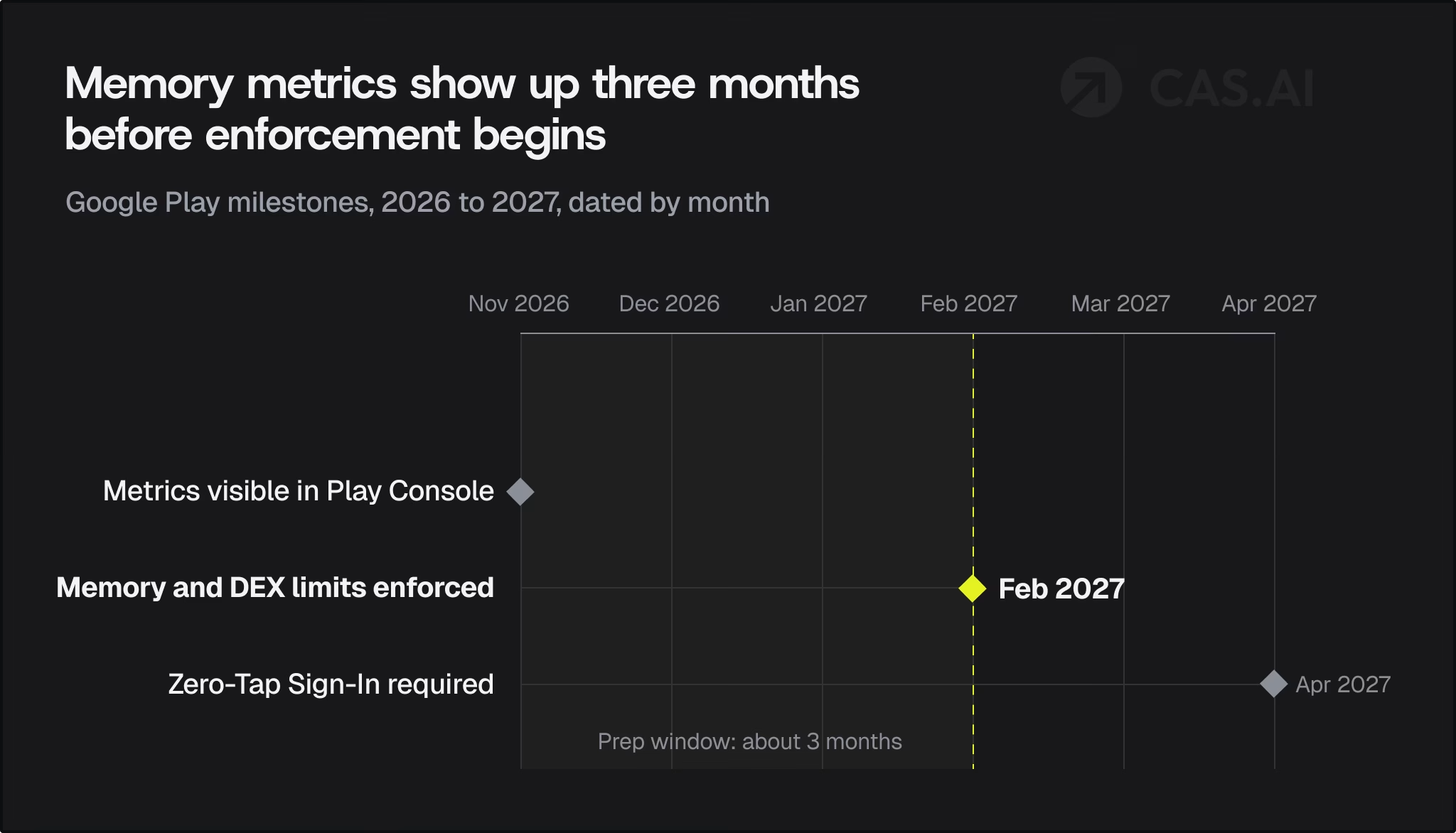
- November 2026: the new memory metrics appear in Play Console, so you can see where you stand before anything is enforced.
- February 2027: memory and DEX requirements take effect.
- April 2027: the separate Zero-Tap Sign-In requirement begins. Games are currently exempt, and Google plans to publish game-specific guidance during 2027.
Android 17 is also clamping down on memory at the system level. If your app goes too far, the OS can just shut it down. Now, Google Play is bringing that same tough love to the app store.
How this affects ad mediation
Ads are some of the biggest memory hogs you can add to an app. Every ad network you plug in brings its own pile of code and libraries. The ads themselves are no better. A flashy interstitial or a rewarded video can fill up your RAM with big images and media files.
With these new rules, all that memory use stacks up fast.
- The more SDKs you add, the more DEX code you pile on. If your game is already close to the 50 MB limit, adding just a few more networks could push you over and force you to start trimming.
- Preloading ads eats up memory. Sure, caching ads ahead of time can help with speed and fill, but it also means you are holding onto big images and media in RAM. On a 4 GB device, you do not have much room to spare.
- It matters what state your ads are in. If a big creative sits in memory while your app is in the background or cached, you could blow past the image memory limits.
- Crashes and forced closes sting even more now. If Android slows down or shuts off your app for using too much memory, the session ends right there, and you lose all the ad impressions you could have earned.
So there is a trade-off. Stacking up ad networks to chase every last dollar might now cost you in stability and how your app ranks in the store.
How this affects ad monetization
Your revenue depends on how long people use your app, and that depends on how stable and easy to find it is.
- If your app slows down or crashes because of memory, people spend less time in it. That means fewer ad impressions per user, and your ARPDAU drops.
- If Google Play stops showing your app up front, you get fewer installs. You end up paying more to reach the same users, and your return on ad spend takes a hit.
- If you get blocked from pushing updates, your plans stall. You cannot roll out new ad spots or try out new ways to make money.
- The pain hits low-end markets first. In many places, 4 GB phones are the norm. If you count on those regions for most of your users, these new limits will hurt you where it counts.
The bottom line: memory performance is now part of your revenue game, not simply a technical detail.
What publishers should do now?
- Come November, open up Play Console and see where you stand. Use the new Vitals as your starting point, and pay attention to the top 10 percent numbers for each device type.
- Take a hard look at your SDK stack. Write down every network and adapter, see how much code and memory each one adds, and drop the ones that are just dead weight.
- Rethink how you preload ads. Cache fewer creatives, and make sure to clear them out when your app goes into the background.
- Use R8 the right way. Turn on shrinking, optimization, and obfuscation, and make sure that you hit the 25 percent mark before your first 2027 release.
- Test your app on a 4 GB phone. If it only runs smoothly on high-end devices, you are going to have problems with these new rules.
- Keep an eye on revenue and stability at the same time. Watch your ARPDAU, crash rate, and memory use together. Run A/B tests to make sure every change keeps your earnings safe before you roll it out to all users.
Where CAS.AI fits in
This is the moment when your ad mediation partner really counts. You want a platform that helps you run only the networks that matter, keeps things light, and balances fill with performance. That way, you can stay under the new limits without losing money. CAS.AI is built for this. It helps you squeeze the most out of every impression while keeping your app quick and stable. Check out CAS.AI Mediation and Publishing to see how they fit your needs.
With CAS.AI, you can:
- CAS.AI gives you the tools and guidance to trim your mediation stack. Keep the networks that pull their weight and cut the ones that just slow you down.
- Tune your ad delivery so that loading and caching work well even on phones with less memory.
- Track revenue in one dashboard and see how each change affects your eCPM, ARPDAU, and fill rate.
[CTA: Talk to the CAS.AI team about a mediation audit before the February 2027 deadline. → link]
Bottom line
Google’s new rules are simple: slim apps win, bloated ones lose. If you make money from ads, your best bet is to treat memory use as part of your revenue plan. Use fewer heavy SDKs, preload ads wisely, keep your code tight, and pick a mediation partner that helps you do all this without cutting into your earnings.
Sources
- The Register: Google forces Android apps to use memory more wisely
- TechRepublic: Google Sets February 2027 Deadline: Android Apps Must Meet New Memory Limits